THE SPACE TO WRITE.

Make room
for the story.

A quiet screen for your next screenplay.

Free. Offline. Yours. v0.4.3 beta

Apple Silicon · macOS 15 or later

Not Apple-notarized. Mac installation help ↗
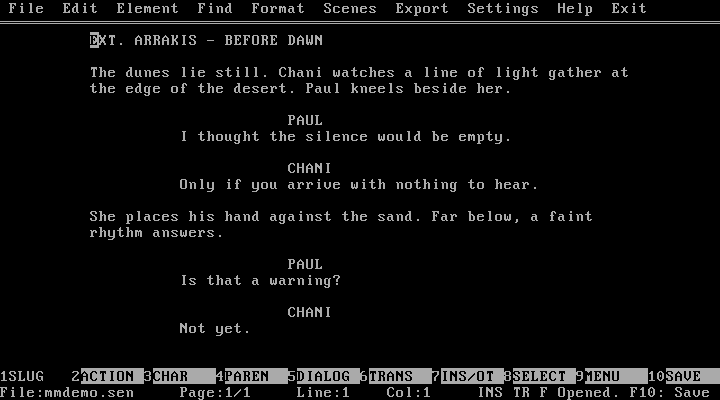
Actual Movie Master app screenshot showing an original Arrakis scene with Paul and Chani, the real DOS menus and function keys.
Captured from the app. An original scene set on Arrakis.

Six elements.
One rhythm.

Everything a screenplay needs.
Just a keystroke away.

Fountain in.
Beautiful PDF out.

Bring your draft. Export in Courier Prime.
Keep moving.

Your words.
Your computer.

Write offline. Choose where you save.
Turkish F keyboard. Locked scene numbers.

Eric Roth at his writing desk, from Academy Originals

A FAMILIAR IDEA.

Great stories.
Simple tools.

In a 2020 conversation, Eric Roth described writing in an old DOS copy of Movie Master. One computer, devoted to the work. That kind of focus is the idea behind this independent app.

Read the conversation

FREE FOR EVERYONE.

A little support.
A lot of possibility.

Always optional. Opening soon.

THANK YOU.

The next chapter.
Coming soon.

Donations aren't open yet. Once a payment provider is chosen, you'll be able to support Movie Master here. The app is already yours to use, for free.

VERSION 0.4.3 · BETA

A few details.

Mac

Apple Silicon, macOS 15 or later. DOSBox-X is included. Open the DMG and drag the app to Applications. This beta is ad-hoc signed and isn't Apple-notarized, so macOS may block its first launch. Read the Mac installation instructions. No Intel Mac build is included.

DOS & Windows

The ZIP includes DOS, WIN32 and WIN64 builds. Windows 10–11: extract the entire ZIP and run BASLAT.BAT. DOS: 386+, VGA and extended memory; 32 MB recommended. Keep FONT.TTF and CWSDPMI.EXE beside WRITER.EXE. Windows builds are compiled but haven't been tested on a live Windows machine.

First Save: F10 → choose a folder → F5 Save Here → enter a name. Save As and every export let you choose a location again.